
AWC Electronics - Seabass Language Compiler
New: Try our SeaBass online demo!
Programming microcontrollers in assembly language is difficult. That's why most microcontrollers have C language support. While C is easier than assembly language, it is still tough to learn. That's why many microcontroller users like to use Basic. Unfortunately, Basic isn't always supported on every microcontroller, and even when it is, the Basic compilers are often not as efficient and capable as the system C compiler.
So how do you choose between assembly, C, and Basic? With SeaBass, the new language translator from AWC, you don't have to! You can write Basic-like programs for nearly any microcontroller that supports C. What's more you can directly access existing C libraries, mix C code with your programs, and even embed assembly language if your C compiler supports it (and most of them do). With SeaBass you get the best of both worlds. Writing SeaBass code is efficient for you, and the C compiler will generate efficient code that executes on your microcontroller.
SeaBass works with our PIC16F APP-II kit (in conjunction with the open source SDCC compiler) and with our Atmel ATMega APP-IV kit (using GNU C). However, SeaBass will work with nearly any C compiler on nearly any processor. For example, you can read how to use SeaBass with the Rabbit Semiconductor devices and Dynamic C.
As an example, consider our APP-IV kit. This board uses an Atmel ATmega8 and works well with the free GNU C compiler. Here's part of a SeaBass program for this board:
DIM j
OUTPUT(B,0)
OUTPUT(D,7)
TOGGLE(D,7)
FOR j= 1 to 25
  TOGGLE(B,0)
  TOGGLE(D,7)
NEXT
This sets PORTB pin 0 and PORTD pin 7 to outputs and then flips the state of PORTD pin 7. Next a FOR loop causes the bits to flip back and forth repeatedly.
It's easy to include C libraries in your programs or even call C functions:
Dim i,q
for i= 1 to 10
  q=adc_convert(1)
  @printf("Value= %d\n",q);
next
Here, the code uses the C library adc_convert to read an analog value. It then uses the C-language printf call to write a string to the serial port.
SeaBass can also handle the entire build process on supported platforms (and you can customize this support for other compilers). However, SeaBass always creates a C source file so advanced users can study its output or use platform debugging tools.
How simple is it to use SeaBass? It's easy. You can use SeaBass as a command line program or in a windowed interface:
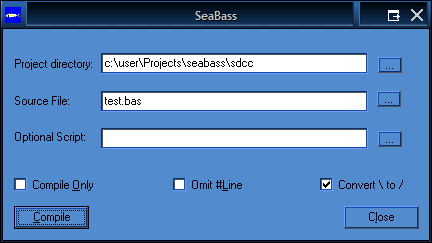
Press Compile, and you are done. On supported platforms, this will not only generate a C source file, but also invoke the C compiler to build an object file ready for programming. With the APP-IV, SeaBass will even download the program to the chip automatically!
The Language
SeaBass supports most common Basic keywords, plus a few special keywords. Remember, you can also call C and assembly routines, so functions supported by your C compiler are also available.
|
@ |
C Pass through |
|
@@ |
Multiline C pass through |
|
' |
Comment at start of line |
|
` |
Comment at end or start of line |
|
#Link |
Add C file to compile |
|
Array |
Define an array |
|
Cinclude |
Include C file |
|
Const |
Define constant |
|
DefType |
Define type |
|
Dim |
Declare variable |
|
Do/Loop |
Execute code repeatedly |
|
End |
Stop program or end subroutine/function |
|
For/Next |
Execute code repeatedly |
|
Function |
Define a function |
|
Goto |
Goto a label |
|
If/Then/Else |
Conditionally execute code |
|
Include |
Include a SeaBass file |
|
Let |
Optional assignment keyword |
|
Rem |
Remark |
|
Return |
End a function or subroutine |
|
Sub |
Define a subroutine |
There are a few differences between SeaBass and traditional Basic that you should be aware of:
| All variables must be declared with Dim or Array Example: Dim x as int | |
| Comments at the end of a line start with ` (a back quote) instead of an ordinary quote Example: x=f() ` Set x to the current value |
|
| Arrays use square brackets ([]) for indices: Example: sample[i]=getValue() |
|
| Identifier names for variables, functions, and subroutines are case sensitive Example: X=x+10 ` two different variables |
|
| Calling a subroutine or a function with no arguments still requires empty parenthesis Example: x=f() |
|
| Functions return a value via the RETURN statement Example: RETURN 10 |
|
| You must avoid using words reserved by your C compiler as identifiers even if they are legal Basic identifiers Example: break=10 ` break is reserved by C compiler! |
|
| Parameters are passed to functions and subroutines by value, not by reference (that is, functions and subroutines receive copies of their arguments by default) | |
| There is no GOSUB statement (SeaBass uses named functions with formal parameters) | |
| SeaBass does not support Basic string handling (although you can use C-language strings with no problem) | |
| SeaBass uses C-language operators, most of which are the same as their Basic equivalents; a few are different (for example Basic's MOD operator is % in SeaBass) |
There is one exception to the last rule. Although C uses == and != as operators, SeaBas recognizes = and <> for these operations just as Basic does.
Want to Know More?
You can read the SeaBass manual online. In addition, check out this article about using SeaBass. If you use the Rabbit Semiconductor (Z-World) devices you might be interested in this article. You can even try out a demo of SeaBass online.
If you'd like to get the latest set of examples to examine (or to refresh the copy on your CDROM) you can find them in sbexample.zip.
Get it Now
SeaBass is just $9.95 with the purchase of a complete APP-II or APP-IV kit (bare board kits are not eligible for this promotion).
SeaBass requires Windows 98 or higher, a C compiler (open source compilers are included on our CDROM included with the APP-II and APP-IV), and target hardware with a programmer (for example, our APP-II or APP-IV).
Add to Cart SeaBass CDROM $9.95 (with purchase of APP-II or APP-IV kit only)
Add to Cart SeaBass CDROM $19.95 (no additional purchase required)
Site contents © 1997-2018 by AWC, Houston TX (281) 334-4341