
AWC Electronics - GP3 I/O Kit
Serial data acquisition with digital and analog I/O plus more
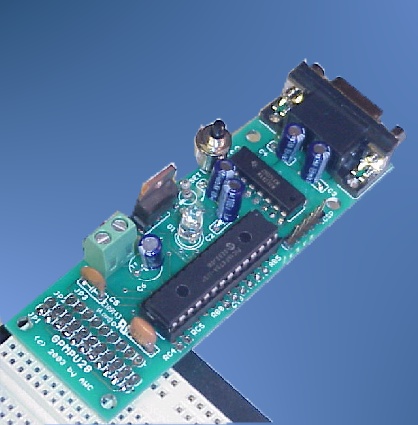
GP-3
Shown with some optional or user-supplied components and breadboard
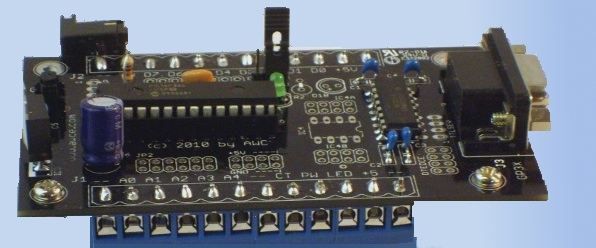
GP-3X
With optional screw terminals and RS232 (USB also available)
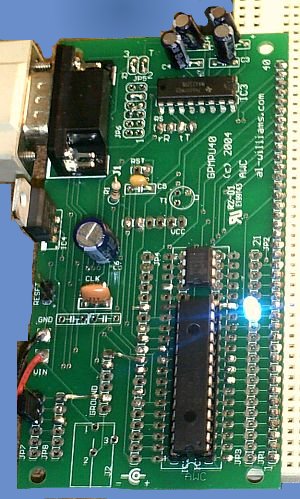
GP-3B
Shown with some optional or user-supplied components and breadboard
Looking for support files and documents for the GP3? More photos available
What is it?
The GP-3 is a low-cost very versatile interface that connects your PC to the outside analog and digital world. You can use this board in two different ways. First, you can connect it to your PC via an RS232 port or a USB port and use the programming language of your choice to sense and control the real world. The GP-3 supports just about any language or operating system. AWC provides libraries for Visual Basic, Visual C++, C#, Windows Scripting Host, Delphi, Java, and generic source code libraries that will work with Linux or just about any other operating system. You can also use our free prewritten software to plot analog values or do basic data acquisition. Even better, you can use our revolutionary GP3EZ system to create many common types of embedded applications with no programming whatsoever. You simply point and click and build your application. You have to see this tool in action to appreciate it, so you might want to check out the demonstration video.You can even use a GP3 to remotely control and sense things over a LAN or the Internet!
If you use GP3EZ, there is another way you can use the GP3. You can do your development using this easy to use tool. If you obey certain rules, you can then have GP3EZ program the GP-3 board with your application. Then it will run without being connected to the PC! Suppose you are using the GP3 to sequence some lights for a holiday display. You can easily modify the sequence and timing on the PC until you have it the way you'd like. Then you can program the GP-3 and it will carry out your commands without the PC. It will continue to do this until you reprogram it with a new program. Of course, you can still use it connected to the PC anytime you like. This brings a new level of affordability to embedded projects.
What can it do?
The GP-3 has an impressive slate of features including:
- 8 general purpose I/O lines (digital input/output with special features like PWM or pulse output)
- 5 10-bit A/D inputs (separate from digital pins)
- 1 hardware PWM output (operates continuously)
- 1 hardware counter input (operates continuously)
- 1 LED under software control
- True RS232 from onboard 5V supply
- EEPROM for storing configuration or serial numbers (256 bytes)
- ActiveX control (OCX) and DLL supplied; or control via serial protocol (57600 baud)
- Portable C library source with examples for Linux, Cygwin, and Windows
- Java object for use with Java (requires javax.comm support)
- Easy to use with LabView and other popular software, including Excel
- Component for Gambas -- Visual Basic-like rapid application development for Linux.
- The GP-3X can be configured to use RS232 or you can select a native USB interface. The other models will work with most USB to RS232 cables.
This versatile kit can be customized to use different power supplies or customized I/O. Imagine the power of real world I/O in your next project. Here are just a few ideas:
- Monitor temperatures or voltages
- Control a motor or fan using PWM
- Read external switches or sensors
- Control solid state relays or other devices
The GP-3 has found applications in model rocketry, security systems, holiday and museum displays, factory automation, solar power monitoring, ham radio, and automated test set ups. Anywhere you need analog and digital I/O, the GP-3 is a powerful and economical answer.
What resources are available?
You can find all the software and documentation for the GP-3 in the GP-3 Center.
What else do I need?
All you supply is a cable to the computer (a standard serial cable or a USB serial port -- you can order them as options or use your own; the GP-3U is a GP-3X board with a built in USB port in which case you need a standard mini-USB cable) and a DC power supply or 9 volt battery. The GP-3 has an onboard 5V regulator, or you can supply 5V regulated directly to it.
This kit is available in three forms (see the pictures at the top of this page). The board on the left is based on the GPMPU28 board and the one on the right is based on the GPMPU40 board. The center board is the GP-3X base board. All of these boards have the same function but differ in the accessories and how you hook things up to them.
Additional Prototype Space
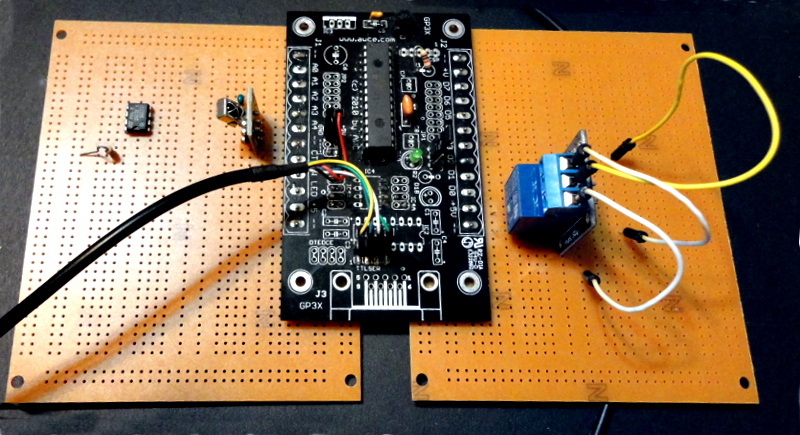
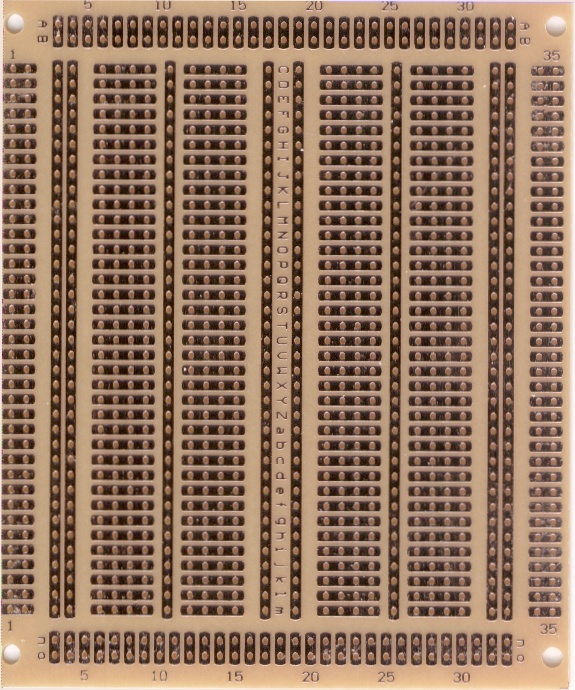
All the GP3 boards have pins on either .2" (GP-3X) or .1" (all others) spacing. You can easily connect these to prototype boards to get more space. We especially recommend using our PROTO1 board as "wings" (see photo above that shows two wings installed). You can add one to either side of the board or add two to maximize the space for custom circuitry. The hole pattern is handy (see photo) and will allow you to add ICs, relays, sensors, or anything else you need to use your GP3. If you plan to use wings, you'll probably want to order the board without screw terminals unless you intend to mount the screw terminals on the wings.
Which kit is right for me?
Exactly which kit you need depends on what you want. If you want to plug the board into a solderless breadboard the GP-3 or GP-3B are easiest. The GP-3 allows you to select 9 signals and send them to the breadboard (the rest are available, but not on the breadboard). The GP-3B brings all pins out to the breadboard. The GP3-X (and GP3-XU) can plug into a breadboard but since it has pins on each side, it isn't always as convenient. However, as an option you can get the GP-3X with screw terminals which makes hooking things up without a solderless breadboard much easier.
- GP-3X - Best value. Serial port and many customizable options. Optional screw terminals, space for extra circuitry, and handy GP3EZ jumper. Available assembled or in kit form.
- GP-3XU - The same great kit as the GP-3X but with a USB daughter board that provides communications and power to the board.
- GP-3 - The original. Very small form factor and easily plugs into a solderless breadboard providing a user-selectable subset of the I/O pins to the breadboard.
- GP-3B - A GP-3 built on our GPMPU40 Universal Board. Plugs into a breadboard with lots of room for custom circuitry. Dedicated GP3EZ jumper.
Please note that this is a kit and does require soldering and basic electronic tools (unless you buy an assembled version). This allows you to customize the board to fit your needs. All the parts are through hole, and the solder masked board is very easy to assemble.
What about Arduino or Raspberry PI?
We offer a GP-3 especially for expanding the Arduino's I/O capability-. There is also a version just for the Raspberry PI that uses 3.3V just like the PI (see below).How do I get one?
RS232 Kits
Add to Cart GP-3X complete kit $49.95
Add to Cart GP-3X kit with screw terminals $54.95
Add to Cart GP-3 complete kit $44.95 SALE: $34.99
Add to Cart GP-3B (GPMPU40-based) complete kit $69.95SALE: $45.99
RS232 Assembled
Add to Cart GP-3X assembled with screw terminals $89.95
Add to Cart GP-3 assembled and tested $79.95SALE: $69.99
USB Kit
Add to Cart GP-3XU complete kit with screw terminals $79.99
USB Assembled
Add to Cart GP-3XU assembled with screw terminals $119.95
Special Version: GP3/Pi
Intended for use with 3.3V level serial like the Raspberry Pi, Beagle Board, etc. See the GP3/Pi page for more details
Add to Cart GP-3/Pi complete kit (including screw terminals) $29.95SALE: $19.95
Add to Cart GP-3/Pi assembled (including screw terminals) $42.50
Accessories
Add to Cart NEW! Prototype "wing" for additional prototyping space $4.99
Add to Cart Serial cable (DB9 female to male, 6') $8.99
Add to Cart USB Serial adapter, DB9M to USB B with cable for Windows $19.95
Site contents © 1997-2018 by AWC, Houston TX (281) 334-4341